
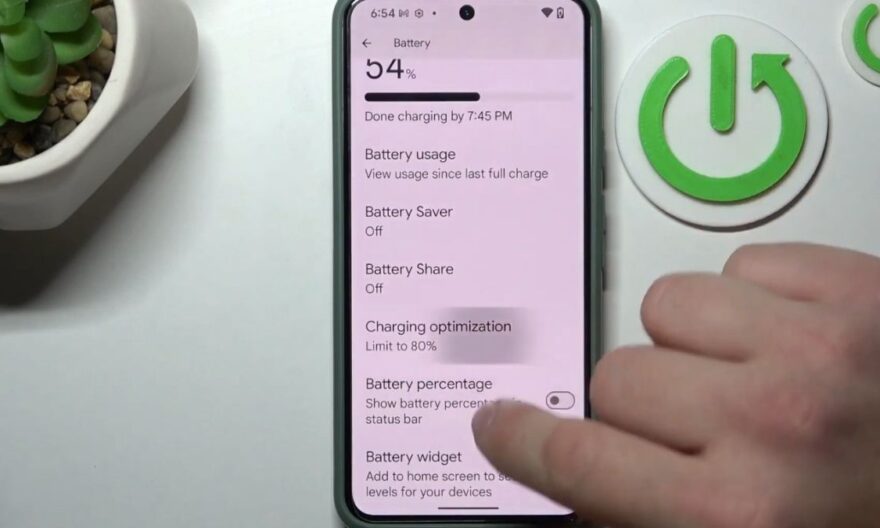
The Pixel 8 stands out for its reliable battery and fast charging system, but some users have noticed that the phone stops charging at 80% without warning, even when plugged in all night. This phenomenon can be surprising, especially when expecting a full charge.
The battery protection mode is activated
Google has integrated intelligent battery management into the Pixel 8 to preserve its longevity.
When the phone detects that the battery has been used intensively or has remained at a high temperature for a long time, it can interrupt charging at 80% to limit the aging of the lithium-ion cell. This mechanism activates automatically, even without visible notification, to protect the battery in the long term.
Why does charging stop before 100% ?
The stop at 80% is not a hardware defect. It is often related to the device’s temperature, the battery’s age, or prolonged charging. When the Pixel 8 remains plugged in for a long time, the system can adjust the charge to avoid prolonged overcharging.
This behavior helps to prevent capacity loss over several years of use, but can surprise users who are not informed.
The effects of environmental conditions
The Pixel 8 takes into account the environment around it. Charging can be blocked at 80% if the phone is exposed to excessive heat, for example when placed under a pillow or in a thick case during charging.
High temperatures can alter the battery’s internal chemistry. The management system adjusts the charge to prevent premature deterioration and ensure that the battery retains its maximum capacity.
Checks to perform before any concern
Before concluding a technical problem, some checks can confirm that the behavior is normal.
Restart and observe the charge
Restarting the Pixel 8 allows you to check if the charge resumes normally. It is advisable to plug the phone into an official or certified charger, and observe if the charge still blocks at 80%.
This simple step helps determine if the blockage is systematic or related to particular conditions.
Update the phone
Software updates can correct some unexpected behaviors related to charging. Checking that the Pixel 8 is up to date and that all available updates are installed ensures that the system manages the battery correctly.
After an update, it is useful to monitor the charge over several cycles to see if the blockage at 80% persists.
Tips for managing smart charging
Even if the blockage at 80% is normal, there are ways to better manage the battery according to your needs.
Activate scheduled charging
The Pixel 8 offers a scheduled charging option, which allows you to set a desired end time for charging. This feature automatically adjusts the charging speed so that the battery reaches 100% at the indicated time, without exceeding for too long.
This allows you to rest easy at night while limiting battery stress.
Avoid heat during charging
Placing the phone on a ventilated surface and removing the case during charging can help reduce 80% blockages related to temperature.
Air circulation around the device decreases heat and allows the battery to charge more regularly, even over long periods.
Use the charger provided by Google
The use of non-certified chargers can cause unexpected stops or irregular charging. The official charger adjusts the voltage and current to optimize battery safety and lifespan.
Avoiding cheap or incompatible chargers reduces the risk of blockage and ensures optimal operation of the Pixel 8.